The Risk Rancher Field Manual, Ch. 11: The Only Numbers That Matter
Part of The Risk Rancher Field Manual, a hands-on guide to starting, scaling, and running a vulnerability management program.
You have built the engine and, if you want, automated it. Sooner or later someone, your boss, the board, a big customer, asks the question every program eventually faces: is it working? Answer it badly and good programs lose their funding to flashier ones. Answer it well and it is a short, honest handful of numbers, which we are going to actually compute: three numbers for the sample program, worked by hand and checked by a script, and the one line in them to talk about first.
Stop reporting vanity
The trap is to report activity and dress it up as progress. “We found forty thousand vulnerabilities this quarter.” “We blocked ten thousand attacks.” These numbers feel impressive and mean nothing. A bigger number reads as either more danger or more busywork, never as things getting better, and nobody on a board can do anything with it. Worse, chasing these metrics rewards the wrong behavior: finding more instead of fixing more. Retire them.
The three numbers that matter
Report outcomes, not activity. Download sample-remediation-log.csv: the twelve findings from your queue that have been verified fixed so far, each with the date it was found, the date its SLA was due, and the date you verified it. A remediation log only holds findings that reached the end; the rest are still open and belong to the backlog, not to these numbers. That tiny log is enough to compute everything that matters. All twelve rows:
| id | asset | priority | found | due | resolved |
|---|---|---|---|---|---|
| F001 | payments-api | P1 | 2026-09-01 | 2026-09-04 | 2026-09-03 |
| F005 | vpn-gateway | P1 | 2026-09-01 | 2026-09-04 | 2026-09-04 |
| F029 | payments-api | P1 | 2026-09-05 | 2026-09-08 | 2026-09-12 |
| F014 | payments-api | P1 | 2026-09-05 | 2026-09-08 | 2026-09-07 |
| F004 | payments-api | P2 | 2026-09-02 | 2026-09-16 | 2026-09-14 |
| F016 | payments-api | P2 | 2026-09-02 | 2026-09-16 | 2026-09-20 |
| F023 | customer-db | P2 | 2026-09-10 | 2026-09-24 | 2026-09-22 |
| F027 | customer-db | P2 | 2026-09-10 | 2026-09-24 | 2026-09-23 |
| F025 | legacy-billing | P3 | 2026-09-03 | 2026-10-03 | 2026-09-28 |
| F018 | customer-db | P3 | 2026-09-03 | 2026-10-03 | 2026-10-10 |
| F013 | marketing-site | P4 | 2026-08-20 | 2026-11-18 | 2026-10-05 |
| F011 | internal-wiki | P4 | 2026-08-20 | 2026-11-18 | 2026-09-30 |
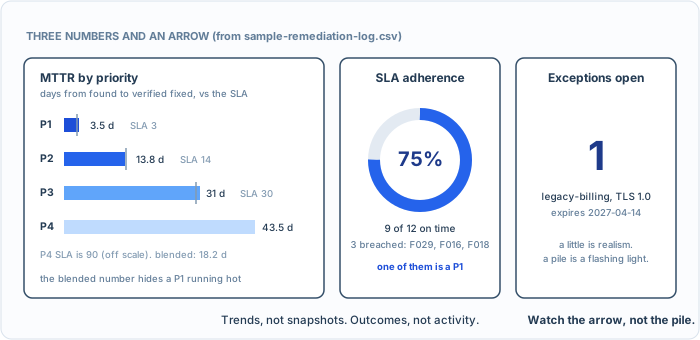
Three honest gauges from the sample log. The P1 bar is just over its line, and that is the one to talk about.
Mean Time to Remediate (MTTR). For each finding, resolved date minus found date, in calendar days, counting the found day as zero. F001 was found on the 1st and resolved on the 3rd, so it took 2 days. Do that for every row, add up the days within each priority, and divide by the number of rows in it. The four P1s took 2, 3, 7 and 2 days, which is 14 days over 4 findings, so the P1 average is 3.5. Always break it out by priority, because one blended number hides the story. (metrics-sheet.csv holds all three definitions and their targets on one page.) On this log:
| priority | MTTR | SLA |
|---|---|---|
| P1 | 3.5 days | 3 |
| P2 | 13.8 days | 14 |
| P3 | 31.0 days | 30 |
| P4 | 43.5 days | 90 |
| blended | 18.2 days | - |
Look at what the blended 18.2 days hides: your P1s close in 3.5 days and your P4s drag to 43. Report only the blended number and you will spend a meeting explaining an eighteen that is actually fine. Report it by priority and the story is clear: the fires get put out fast, the smoke smolders, which is exactly how you want it. A falling P1 MTTR is a program getting healthier, and almost everything in this book exists to drive that number down.
SLA adherence. What share of findings got fixed inside their deadline. Count the rows where resolved date is on or before due date, divide by the total. On this log it is 9 of 12, or 75 percent, and three findings breached their deadline: F029, F016, and F018. Breach here means a missed deadline. Elsewhere in security the same word means an attacker got in, so say which you mean when you report it. MTTR gives you the average; adherence gives you the discipline, and the breaches give you the list to go read. Note that the breaches are not equal: F029 was a P1 that ran four days over its three-day clock, and that one line deserves more of your attention than the two lower-priority slips combined.
Exception volume, and age. How much risk you are formally, knowingly accepting, and for how long. Count the open rows in your exception-log.csv from chapter eight, and for each one the days since it was approved. For the sample that is one open exception, F010, approved on 2026-10-14 and expiring in six months. A little is healthy realism. A lot, or a growing pile of exceptions that keep expiring and reopening, is a flashing light that something upstream is drowning, usually remediation capacity. This number keeps the first two honest, because a team can hit its SLA beautifully by excepting everything hard.
If you want the arithmetic checked, metrics.py is about twenty-five lines and prints exactly this:
python3 metrics.py sample-remediation-log.csv
MTTR P1: 3.5 days  (n=4)
MTTR P2: 13.8 days  (n=4)
MTTR P3: 31.0 days  (n=2)
MTTR P4: 43.5 days  (n=2)
MTTR blended: 18.2 days
SLA adherence: 9/12 = 75%
breaches: F029 (P1), F016 (P2), F018 (P3)
Try it. Compute all three yourself off the log first, by hand, then run the script to check: the per-priority MTTR, the adherence percentage, and the breach list. Your numbers should match the output above. Then ask the real question the numbers set up: which single breach would you walk into your boss’s office about? If you picked the P1, you are reading metrics the way a program owner does, not the way a dashboard does.
If you want a fourth, track the trend of the active backlog: is the herd growing or shrinking over time? Direction matters more than the absolute count.
How to show them
Keep it to those few, and show them as trends, not snapshots. A board does not want your scanner dashboard; they want a line that goes the right way. MTTR down, adherence up, exceptions owned and aging out. Three numbers and an arrow, in a language the business actually speaks. That is a program winning, told in a sentence.
If you run the tool, it already has most of these numbers, because it watched every finding travel from found to patched, whether a re-scan closed it or you verified it by hand: a live MTTR, the count of what is overdue right now, and the split of patched versus risk-accepted versus false-positive are on its metrics page. Two honest gaps: its MTTR is the blended one, and it has no adherence number at all, so the per-priority table you just built is still yours to compute, once a month, from the same log. The lesson is the same whichever way you compute it: report the outcome, not the activity, and never let a blended average hide a P1 that is on fire.
Three numbers for the sample program, then: 3.5 days on the P1s, 75 percent adherence, one open exception. And one line to talk about first: the P1 that ran four days over. That is the engine, built, run, scaled, and measured. One thing left, the only thing that ever really mattered: doing it tomorrow, and the day after that.