The Risk Rancher Field Manual, Ch. 6: Sorting the Herd
Part of The Risk Rancher Field Manual, a hands-on guide to starting, scaling, and running a vulnerability management program.
This is the chapter the whole book has been walking toward, and it is the one your spreadsheet does not survive. Everything before now was setup: you sized the program, mapped the herd, built the alliance with IT, cast the nets. Now the findings pour in from every scanner and pentest and bug report, thousands of them, and they arrive as one undifferentiated wall of red.
Triage is the act of turning that wall into a short, ordered list of things worth doing today. It is the core of vulnerability management, the whole ballgame, and it is where Risk Rancher was born, because doing it by hand is where I personally lost the most hours of my career.
We are not going to talk about it in the abstract. You are going to do it, on a real file, right now: 29 rows in, a ranked list of 24 things to do out, and an answer key to check it against. You need a spreadsheet, or Python 3 if you want the script to do the arithmetic for you.
The pile we will actually work
Download these two files:
- sample-findings.csv: 29 findings from a handful of scanners, across eight systems. The ids run F001 to F030 with F003 missing, because a real export is never tidy, and you will learn to stop expecting it to be. This is your wall of red in miniature. A real export is fourteen thousand rows of this; the moves are identical.
- sample-assets.csv: the eight systems, with the criticality and exposure you set back in chapter two.
Open the findings file. It is a mess on purpose: duplicates, false positives, scary numbers on boxes nobody can reach, and quiet mediums on systems that would end your company. All 29 rows, as the scanners handed them over. Three columns are left off the page for width: the CVE id, the scanner’s description and its suggested fix. Read the rest left to right: the scanner that reported it, the asset, the scanner’s title, the scanner’s severity label and its CVSS score, whether the finding is on the known-exploited list (kev, explained in move 3), and the exposure and criticality you set for that asset in chapter two.
| id | source | asset | title | sev | cvss | kev | exposure | criticality |
|---|---|---|---|---|---|---|---|---|
| F001 | Trivy | payments-api | CVE-2021-44228 Log4Shell RCE | Critical | 10.0 | yes | internet | crown-jewel |
| F002 | Nessus | payments-api | Apache Log4j2 Remote Code Execution | Critical | 9.8 | yes | internet | crown-jewel |
| F004 | OWASP ZAP | payments-api | SQL Injection in /orders search | Medium | 6.1 | no | internet | crown-jewel |
| F005 | Nessus | vpn-gateway | CVE-2023-27997 FortiOS heap overflow (pre-auth RCE) | Critical | 9.8 | yes | internet | crown-jewel |
| F006 | Trivy | dev-sandbox | CVE-2024-3094 xz backdoor RCE | Critical | 10.0 | no | isolated | dev |
| F007 | Semgrep | jenkins-ci | Hardcoded AWS secret key in pipeline | Critical | 9.1 | no | internal | standard |
| F008 | OWASP ZAP | marketing-site | SQL Injection (possible) | High | 7.5 | no | internet | standard |
| F009 | Nessus | customer-db | Outdated OpenSSL 1.0.2 | High | 7.5 | no | internal | crown-jewel |
| F010 | Nessus | legacy-billing | TLS 1.0 / weak ciphers enabled | High | 7.4 | no | internal | crown-jewel |
| F011 | SonarQube | internal-wiki | Cognitive complexity too high | Low | 3.1 | no | internal | standard |
| F012 | Trivy | customer-db | CVE-2022-0778 OpenSSL infinite loop (DoS) | Medium | 5.9 | no | internal | crown-jewel |
| F013 | Nessus | marketing-site | Missing HTTP security headers | Low | 2.6 | no | internet | standard |
| F014 | Prowler | payments-api | S3 bucket allows public read | High | 8.2 | no | internet | crown-jewel |
| F015 | Trivy | jenkins-ci | CVE-2023-44487 HTTP/2 Rapid Reset | High | 7.5 | yes | internal | standard |
| F016 | Semgrep | payments-api | Use of weak hash (MD5) for signature | Medium | 5.3 | no | internet | crown-jewel |
| F017 | Nessus | internal-wiki | Self-signed TLS certificate | Low | 2.9 | no | internal | standard |
| F018 | OWASP ZAP | customer-db | Verbose SQL error messages | Medium | 5.3 | no | internal | crown-jewel |
| F019 | Trivy | dev-sandbox | CVE-2023-0286 X.400 type confusion | High | 7.4 | no | isolated | dev |
| F020 | Prowler | payments-api | IAM user with no MFA | Medium | 6.5 | no | internet | crown-jewel |
| F021 | Nessus | vpn-gateway | Deprecated SSL-VPN web mode enabled | Medium | 5.8 | no | internet | crown-jewel |
| F022 | SonarQube | jenkins-ci | Unused variable | Low | 1.0 | no | internal | standard |
| F023 | Trivy | customer-db | CVE-2021-3711 OpenSSL SM2 buffer overflow | Critical | 9.8 | no | internal | crown-jewel |
| F024 | OWASP ZAP | marketing-site | Cookie without Secure flag | Low | 3.1 | no | internet | standard |
| F025 | Nessus | legacy-billing | SNMP default community string public | Medium | 5.3 | no | internal | crown-jewel |
| F026 | Prowler | dev-sandbox | Security group open to 0.0.0.0/0 on 22 | High | 7.3 | no | isolated | dev |
| F027 | Semgrep | customer-db | SQL string concatenation in query builder | High | 7.1 | no | internal | crown-jewel |
| F028 | Trivy | marketing-site | CVE-2023-38545 curl SOCKS5 overflow | Medium | 5.9 | no | internet | standard |
| F029 | Nessus | payments-api | CVE-2014-0160 Heartbleed | Critical | 7.5 | yes | internet | crown-jewel |
| F030 | SonarQube | internal-wiki | TODO comment left in code | Low | 1.0 | no | internal | standard |
That is what a real export looks like. There are three moves, and you do them in order: kill the noise, merge the duplicates, fix the scores.
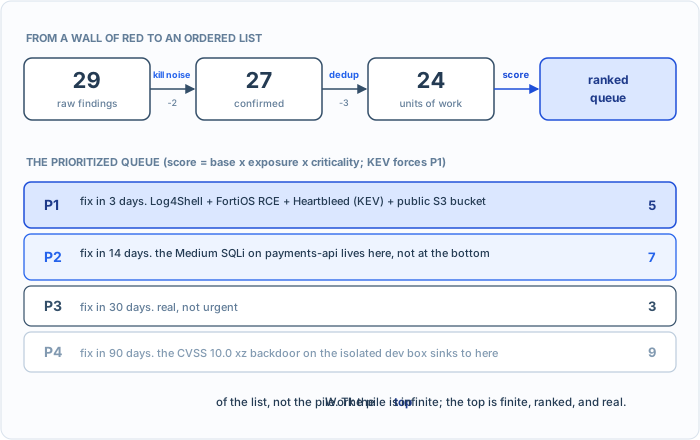
The whole chapter in one picture. Three passes turn the wall of red into a ranked list, and you work the top. The counts in it are where you will be by the end of the chapter.
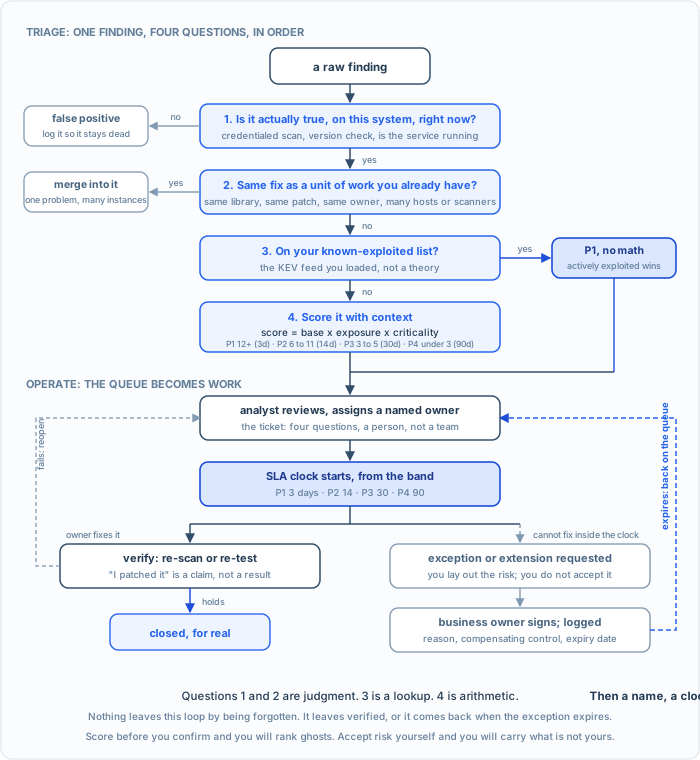
The whole operate loop on one page. Four questions turn a finding into a priority; then a name, a clock, and a check turn the priority into a fix, or into a signed, expiring exception that comes back. Chapters seven and eight work the bottom half.
Move 1: kill the noise
The sea of red is mostly not real. Scanners guess, and a large share of any scan is false positives, findings that are simply wrong: a patch applied but invisible to the scanner, a version string that looks vulnerable but was quietly backported, a finding on a service that is not running. Backported means the vendor fixed the bug inside the old version number without bumping it, which Linux distributions do all the time, and which a scanner reading version strings cannot see.
Walk the file and ask one question of each finding: is this actually true, on this actual system, right now? To answer it you read the finding’s description and you read what you know about the asset, which is why chapter two’s notes column exists. Two in this file are not. F007 says a hardcoded AWS secret key was found in a pipeline; its description quotes the key, and that key, AKIAIOSFODNN7EXAMPLE, is the one Amazon prints in its own documentation as an example, which a smoke test is using on purpose. F008 says SQL injection on marketing-site; your asset list says that site is static HTML with no database, so there is nothing to inject into. Neither check needed a tool. Both needed you to read.
| id | finding | why it is not real |
|---|---|---|
| F007 | Hardcoded AWS secret in the Jenkins pipeline | The string is AKIAIOSFODNN7EXAMPLE, the example key straight out of AWS documentation, used in a smoke test. Not a credential. |
| F008 | SQL Injection on marketing-site | The marketing site is static HTML. No database, no server-side parameters. The scanner saw a query string and guessed. |
Kill both. And when you kill one, write down that you killed it, because a false positive you dismiss today comes back on every scan forever unless you record the decision. Log them in removed-before-scoring.csv. A program without a memory re-litigates the same garbage every week. (In the tool, that log is a suppression rule: one entry closes the finding and keeps it closed on every scan after; chapter ten shows it.)
Twenty-nine findings, two gone. Twenty-seven left.
Move 2: merge the duplicates
The same vulnerability shows up many times: once per host, once per scanner, once per scan. Look at these two:
| id | scanner | asset | title |
|---|---|---|---|
| F001 | Trivy | payments-api | CVE-2021-44228 Log4Shell RCE |
| F002 | Nessus | payments-api | Apache Log4j2 Remote Code Execution |
Same CVE, same host, two scanners, two different titles. That is not two problems. It is one problem with one fix (bump Log4j to 2.17.1 and rebuild), and you work it as one unit. Merge F002 into F001 and note it.
The test is not “same CVE”. The test is same fix: if one change closes them all, they are one unit of work. Look at customer-db for the subtler case:
| id | scanner | asset | title | severity |
|---|---|---|---|---|
| F009 | Nessus | customer-db | Outdated OpenSSL 1.0.2 | High |
| F012 | Trivy | customer-db | CVE-2022-0778 OpenSSL infinite loop (DoS) | Medium |
| F023 | Trivy | customer-db | CVE-2021-3711 OpenSSL SM2 buffer overflow | Critical |
Three different titles, three different CVEs, one cause: an old OpenSSL on one host. One upgrade closes all three. Merge F009 and F012 into F023, which is the worst of the three and the one that will carry the ticket. When the upgrade lands, the next scan will close the other two on its own. Note both merges in removed-before-scoring.csv so nobody re-litigates them next week.
This move is the difference between a fourteen-thousand-row list and a two-hundred-item list, and nothing else you do all week removes as much work for as little effort. You cannot work fourteen thousand rows. You can work two hundred.
In the tool, the easy half of this is automatic: Risk Rancher treats a finding with the same scanner, asset and title as the same finding, so the identical row landing again on tomorrow’s re-scan never makes a second ticket. The hard half stays with you. No tool knows that “Log4Shell RCE” from Trivy and “Log4j2 Remote Code Execution” from Nessus are one library, or that three OpenSSL titles are one upgrade. You merge those by knowing the systems.
Twenty-seven findings, three merged into two. Twenty-four units of work left.
Move 3: fix the scores
Here is the big one, the secret the scanner vendors would rather you not dwell on: the CVSS score on every finding is lying to you. Not out of malice. It is context-free. A CVSS of 9.8 means “this is bad in the abstract.” It has no idea that this instance is on an offline test box nobody can reach, or that this unremarkable Medium is sitting on your public customer database.
So you take the scanner’s severity and bend it with the two things the scanner does not know: how exposed the asset is, and how much you care about it. Here is the rubric. It is deliberately simple, because a rubric you can run in your head on a bad Monday beats a perfect model you never apply.
| factor | values |
|---|---|
| base (scanner severity) | Critical 4, High 3, Medium 2, Low 1 |
| exposure | internet-facing 2, internal 1, isolated 0.5 |
| asset criticality | crown-jewel 2, standard 1, dev/throwaway 0.5 |
score = base x exposure x criticality
One override on top: if the finding is on your known-exploited list, it is a P1 no matter what the math says. The list most people use is KEV, the Known Exploited Vulnerabilities catalog that CISA (the US government’s cybersecurity agency) publishes for free: the CVEs that attackers are confirmed to be using right now, not in theory. It is a file you download from CISA’s catalog page, cisa.gov/known-exploited-vulnerabilities-catalog, and search by CVE id. The kev column in the sample is not made up; every flag matches that catalog as of October 2026, so you can check it yourself. Something being actively exploited in the wild beats every theoretical number. It is a blunt rule on purpose.
Where do the factors come from? Base is the scanner’s own four-step label, turned into numbers that keep their spacing. Exposure doubles for the internet and halves for an isolated box, because reachability is the first thing an attacker needs. Criticality doubles for a crown jewel and halves for a throwaway, because consequence is the second. The specific numbers are a starting point, not a law; what matters is that you write yours down and apply them the same way every week. Then turn the score into a priority and a clock:
| score | priority | fix within |
|---|---|---|
| 12 or more | P1 | 3 days |
| 6 to 11 | P2 | 14 days |
| 3 to 5 | P3 | 30 days |
| under 3 | P4 | 90 days |
Now watch what the rubric does to two findings that look nothing like their CVSS.
F006, the 10.0 that does not matter. The xz backdoor, CVE-2024-3094, CVSS 10.0, “Critical,” on dev-sandbox. Terrifying header. But the sandbox is an isolated lab box on an air-gapped subnet. Base 4, exposure 0.5, criticality 0.5. Four times a half times a half is 1.0. That is a P4. Patch it when you get to it. A critical on a ghost is not a critical.
F004, the Medium that does. A blind SQL injection on payments-api, scored Medium, CVSS 6.1. The scanner shrugged. But payments-api is internet-facing and holds cardholder data. Base 2, exposure 2, criticality 2. Two times two times two is 8. That is a P2, and it is a direct path to the data that would end your company. A medium on the crown jewels might be your biggest fire.
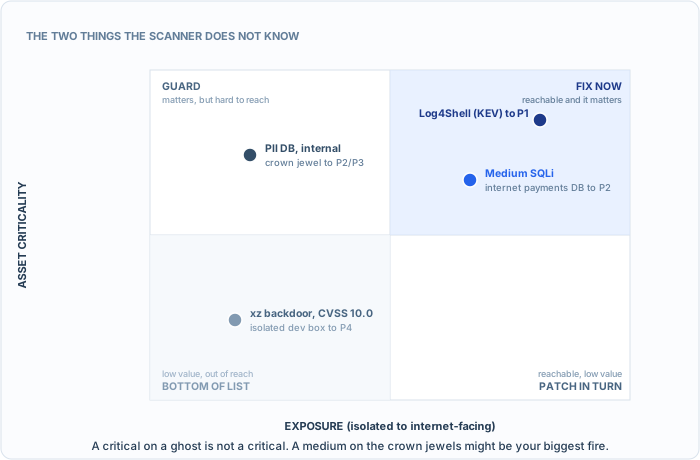
The same CVSS number lands in different quadrants. Where a finding lives decides what it is worth.
That is what “context is king” means in arithmetic. Run the number on all 24, then sort: priority first, so every P1 sits above every P2; score within a priority; and the id to break ties, which is why the three 16s sit in id order and F001 is at the very top. Do it in your sheet, or let score.py do the arithmetic. It is a Python script: save it and the findings file in one folder, open a terminal there, and run the command below. The whole rubric is a few lines. The judgment calls the formula cannot make, the false positives and the merges, are written in at the top where you can see them, and the band line is the four thresholds from the table:
BASE = {"Critical": 4, "High": 3, "Medium": 2, "Low": 1}
EXPOSURE = {"internet": 2, "internal": 1, "isolated": 0.5}
CRITICALITY = {"crown-jewel": 2, "standard": 1, "dev": 0.5}

FALSE_POSITIVES = {"F007", "F008"}
DUPLICATE_OF = {"F002": "F001", "F009": "F023", "F012": "F023"}

score = BASE[severity] * EXPOSURE[exposure] * CRITICALITY[asset_criticality]
priority = "P1" if kev == "yes" else band(score)   # band: >=12 P1, >=6 P2, >=3 P3, else P4
python3 score.py sample-findings.csv
rank  pri score  id    asset           title
   1  P1     16  F001  payments-api    CVE-2021-44228 Log4Shell RCE (KEV)
   2  P1     16  F005  vpn-gateway     CVE-2023-27997 FortiOS heap overflow (pre-au (KEV)
   3  P1     16  F029  payments-api    CVE-2014-0160 Heartbleed (KEV)
   4  P1     12  F014  payments-api    S3 bucket allows public read
   5  P1      3  F015  jenkins-ci      CVE-2023-44487 HTTP/2 Rapid Reset (KEV)
   6  P2      8  F004  payments-api    SQL Injection in /orders search
   7  P2      8  F016  payments-api    Use of weak hash (MD5) for signature
   8  P2      8  F020  payments-api    IAM user with no MFA
   9  P2      8  F021  vpn-gateway     Deprecated SSL-VPN web mode enabled
  10  P2      8  F023  customer-db     CVE-2021-3711 OpenSSL SM2 buffer overflow
  11  P2      6  F010  legacy-billing  TLS 1.0 / weak ciphers enabled
  12  P2      6  F027  customer-db     SQL string concatenation in query builder
  13  P3      4  F018  customer-db     Verbose SQL error messages
  14  P3      4  F025  legacy-billing  SNMP default community string public
  15  P3      4  F028  marketing-site  CVE-2023-38545 curl SOCKS5 overflow
  16  P4      2  F013  marketing-site  Missing HTTP security headers
  17  P4      2  F024  marketing-site  Cookie without Secure flag
  18  P4      1  F006  dev-sandbox     CVE-2024-3094 xz backdoor RCE
  19  P4      1  F011  internal-wiki   Cognitive complexity too high
  20  P4      1  F017  internal-wiki   Self-signed TLS certificate
  21  P4      1  F022  jenkins-ci      Unused variable
  22  P4      1  F030  internal-wiki   TODO comment left in code
  23  P4   0.75  F019  dev-sandbox     CVE-2023-0286 X.400 type confusion
  24  P4   0.75  F026  dev-sandbox     Security group open to 0.0.0.0/0 on 22
Note rank 5. An internal HTTP/2 denial-of-service, an attack that knocks a service over rather than breaking into it, which you would normally shrug at, floated to P1 by one thing: it is on the known-exploited list. And note the very bottom: a box with SSH open to the entire internet, dead last, because the entire internet cannot route to it. The rubric does not care what the finding is called. It cares where it lives and whether anyone is using it.
Try it. Open triage-sheet.csv in a spreadsheet. It is the findings file, minus the long text columns, with seven empty columns to fill.
false_positivetakes yes or nothing.duplicate_oftakes the id this row merges into.base,exposure_factorandcriticality_factorare the three numbers from the rubric,scoreis their product, andpriorityis the band, or P1 ifkevsays yes. Work all 29: mark the two false positives, fill in the three merges, score the rest, sort by priority then score. Then check yourself against ranked-queue-answer-key.csv, whosewhycolumn shows the arithmetic for every row. If your P1s match, you can triage. If a 9.8 is still near your top or a crown-jewel medium is near your bottom, re-read move 3. This is the single most valuable skill in the whole book, and you now have it in your hands, not just your head.
A word on where a tool fits in this chapter. The two judgment calls, which findings are wrong and which are the same fix, are yours; no tool knows that the CVE was reported on a test fixture, or that three OpenSSL findings close with one upgrade. The arithmetic is not judgment, and the tool does it. It ships with exactly the table above, under Configuration, Priority rubric, with every number editable. Load chapter two’s inventory and every finding that lands on a listed asset is scored as it lands: the scanner’s severity as the base, times the asset’s exposure and criticality, banded into the four settings of the tool’s one severity dial. P1 is Critical, P2 is High, P3 is Medium, P4 is Low. The scanner’s own word is kept beside the result, and the drawer shows the sum. Here is the sample going through it, on a throwaway copy of the tool. I run those on ports 8093 and 8094 so the tracker I actually use, on 8080, is never touched; yours answers on 8080. Every line after a $ is exactly the line that ran, starting with the sign-in that gives curl the browser’s cookie and the adapter that maps the file’s columns, which chapter ten explains.
$ curl -s -c cookies.txt -X POST http://localhost:8094/api/auth/login -H 'Content-Type: application/json' -d '{"email":"sheriff@rr.test","password":"<yours>"}' -o /dev/null -w '%{http_code}\n'
$ curl -s -b cookies.txt -X POST http://localhost:8094/api/adapters -H 'Content-Type: application/json' -d '{"name":"Field Manual","source_name":"Field Manual","findings_path":".","mapping_title":"title","mapping_asset":"asset","mapping_severity":"severity","mapping_description":"description","mapping_remediation":"remediation"}' -o /dev/null -w '%{http_code}\n'
201

# Chapter two's inventory goes in first (Configuration > Asset inventory > Load inventory makes this call)
$ curl -s -b cookies.txt -F file=@sample-assets.csv http://localhost:8094/api/admin/assets/csv
{"loaded":8,"rescored":0}


# Then the 29 rows: the tool scores each one against its asset as it lands
$ curl -s -b cookies.txt -o /dev/null -w 'ingest %{http_code} in %{time_total}s\n' -F adapter_name='Field Manual' -F file=@sample-findings.csv http://localhost:8094/api/ingest/csv
ingest 201 in 0.003497s
$ sqlite3 -header -column data/riskrancher.db "select substr(title,1,38) as title, asset_identifier as asset, scanner_severity as scanner, rubric_score as score, severity from tickets where asset_identifier in ('payments-api','dev-sandbox') order by rubric_score desc, title"
title                                   asset         scanner   score  severity
--------------------------------------  ------------  --------  -----  --------
Apache Log4j2 Remote Code Execution     payments-api  Critical  16.0   Critical
CVE-2014-0160 Heartbleed                payments-api  Critical  16.0   Critical
CVE-2021-44228 Log4Shell RCE            payments-api  Critical  16.0   Critical
S3 bucket allows public read            payments-api  High      12.0   Critical
IAM user with no MFA                    payments-api  Medium    8.0    High
SQL Injection in /orders search         payments-api  Medium    8.0    High
Use of weak hash (MD5) for signature    payments-api  Medium    8.0    High
CVE-2024-3094 xz backdoor RCE           dev-sandbox   Critical  1.0    Low
CVE-2023-0286 X.400 type confusion      dev-sandbox   High      0.75   Low
Security group open to 0.0.0.0/0 on 22  dev-sandbox   High      0.75   Low
$ sqlite3 data/riskrancher.db "select severity, count(*) from tickets group by severity order by case severity when 'Critical' then 1 when 'High' then 2 when 'Medium' then 3 else 4 end"
Critical|5
High|9
Medium|6
Low|9
Read the first table against your own sheet. The three KEV rows on payments-api score 16 and land Critical; the S3 bucket is a High on an internet crown jewel, 12, Critical, exactly where you put it; the three Mediums on that box are 8, High; and the xz backdoor, a scanner Critical on the sandbox, is a 1, Low, dead last, for the reason you worked out by hand. The split at the bottom, 5, 9, 6 and 9, is the rubric’s, not the scanners’. It does not match your 24-unit answer key yet because the two false positives and the three merges are still in the pile; those calls are the next chapter’s hand-work in the tool, and the arithmetic on the 24 that remain is the same.
The override is the one thing the arithmetic cannot do alone, because it needs the list. Rank 5 in your queue, the HTTP/2 Rapid Reset on the build server, scores 3 and lands Medium until the catalog is loaded:
$ sqlite3 data/riskrancher.db "select title, scanner_severity, rubric_score, severity from tickets where title like 'CVE-2023-44487%'"
CVE-2023-44487 HTTP/2 Rapid Reset|High|3.0|Medium
$ curl -s -b cookies.txt -F cisa_catalog_file=@known_exploited_vulnerabilities.json http://localhost:8094/api/integrations/cisa/sync
{"message":"CISA KEV Catalog synced successfully","raised":1,"status":"success","vulnerabilities":1741}

$ sqlite3 data/riskrancher.db "select title, scanner_severity, rubric_score, severity, is_cisa_kev from tickets where title like 'CVE-2023-44487%'"
CVE-2023-44487 HTTP/2 Rapid Reset|High|3.0|Critical|1
$ sqlite3 data/riskrancher.db "select actor, activity_type, old_value, new_value from ticket_activity where activity_type = 'rescored'"
KEV sync|rescored|Medium|Critical
$ sqlite3 data/riskrancher.db "select severity, count(*) from tickets group by severity order by case severity when 'Critical' then 1 when 'High' then 2 when 'Medium' then 3 else 4 end"
Critical|6
High|9
Medium|5
Low|9
That is chapter six, done by the machine, with a line in the finding’s history saying who moved it. Two screens from the same run show what the reader of the queue sees.
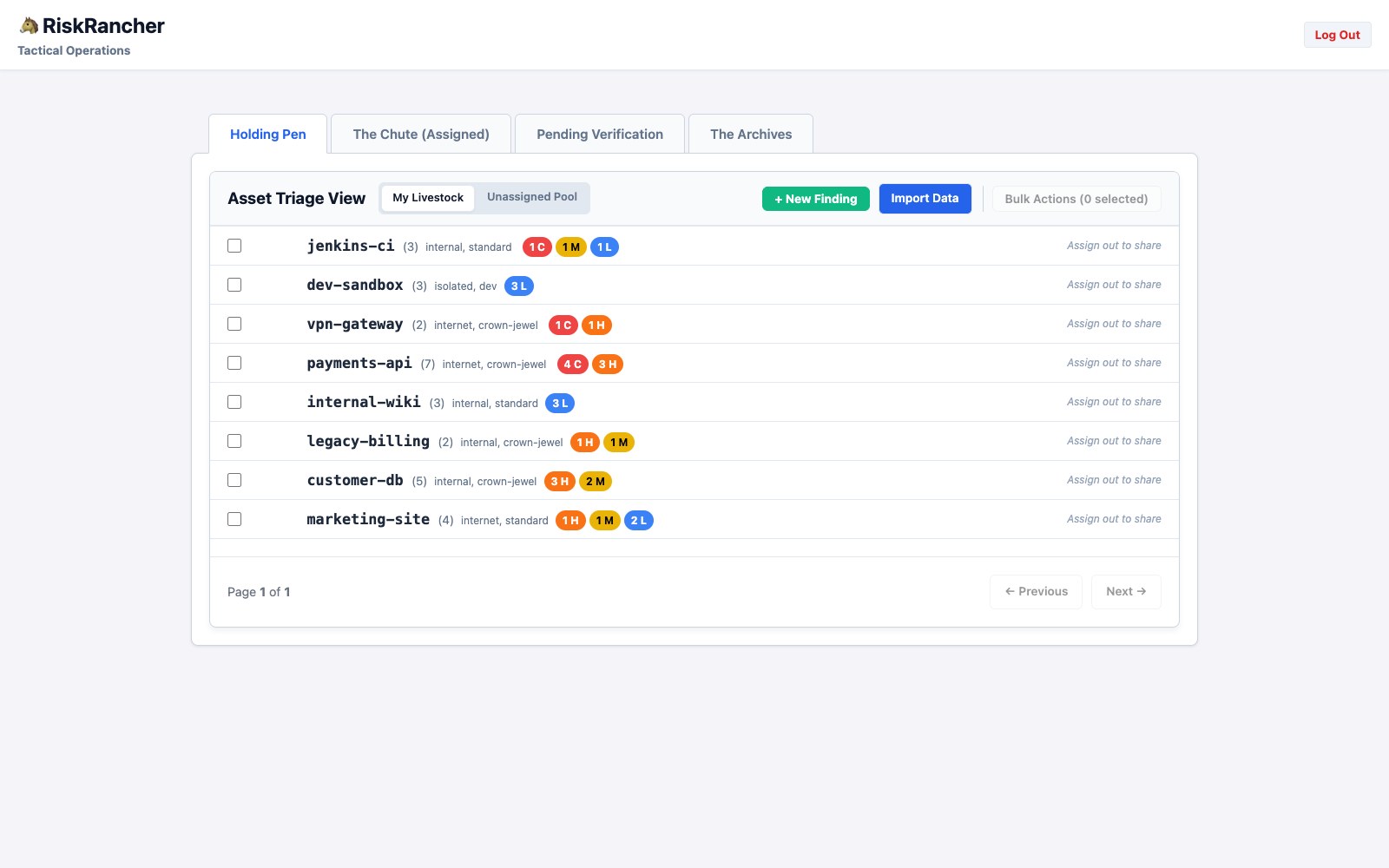
The pen after the rubric. Each asset wears its two labels, and the counts are the rubric’s: the sandbox, three scanner Highs and a Critical among them, shows three Low, and the one Critical on jenkins-ci is the Rapid Reset the catalog raised.
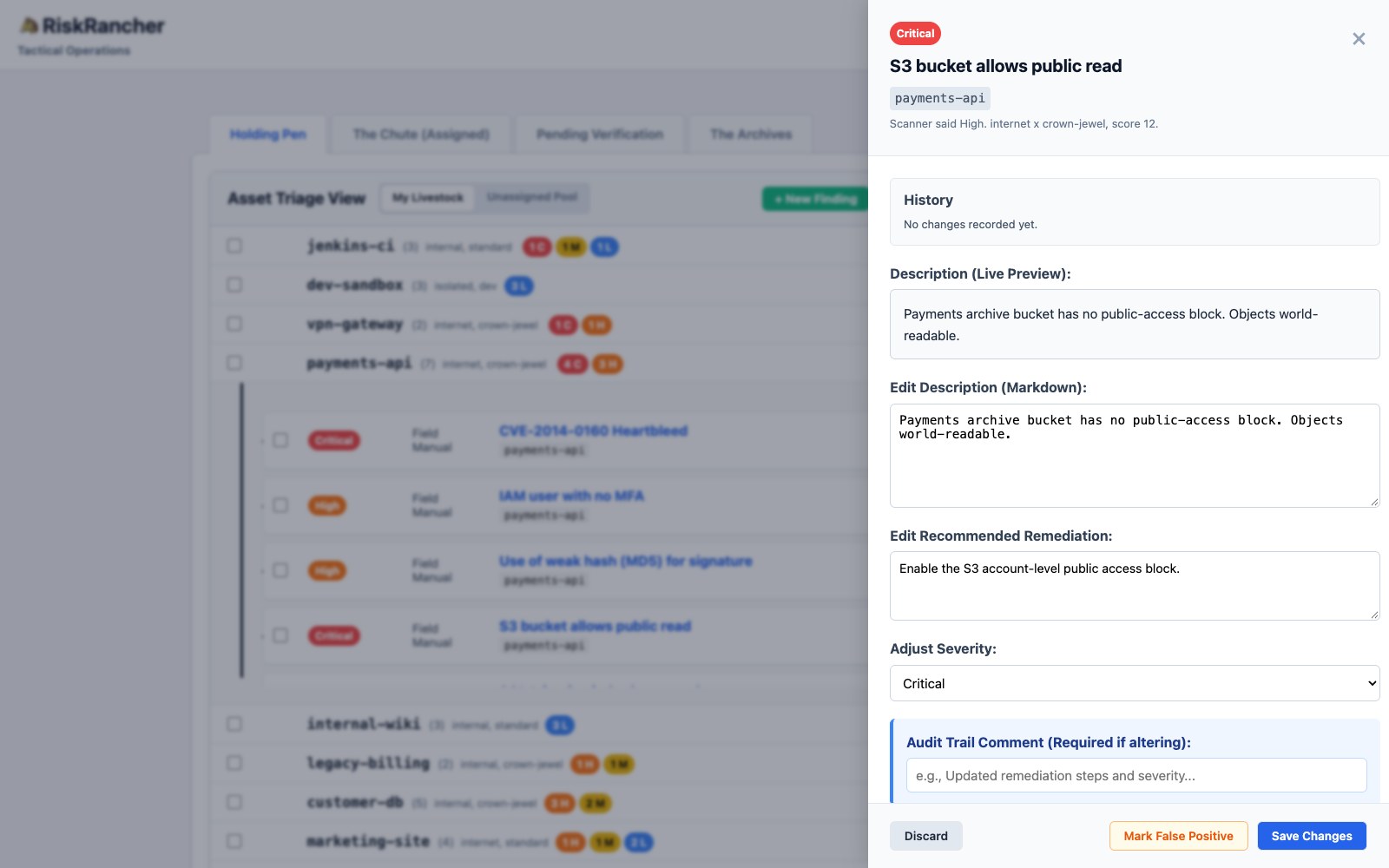
Click a finding and the drawer shows the sum, so nobody has to take the dial on faith.
Do it in the spreadsheet first anyway, so that when the tool shows you a Critical you can check its arithmetic against your own.
The output is your program
Sit with what just happened. You started with a wall of red, undifferentiated and paralyzing, and you ended with a short, ordered list where the top item is genuinely the most important thing you could fix today. That list, not the scan, is your vulnerability management program. Everything downstream, every remediation and every metric, runs off it.
Twenty-nine rows became 24 units of work, ranked, with the two false positives and the three merges written down so nobody argues them again next week, and a rubric you can run on a bad Monday. So work the top of the list, not the pile. The pile is infinite and it does not care about you. The top of the list is finite, ranked, and real. Which brings us to the next problem, because a prioritized finding is still just a finding until somebody closes it. Next: getting it fixed.