The Risk Rancher Field Manual, Ch. 10: Automating the Herd
Part of The Risk Rancher Field Manual, a hands-on guide to starting, scaling, and running a vulnerability management program.
Across chapters six, seven, and eight you worked one real file by hand: you triaged 29 raw findings into a ranked queue, turned the top one into a ticket with a verify step, and deferred two more with an owner and an expiry. Chapter nine gave every one of those moves its name in the tool. You know how every step works because you did each one yourself. Which means you have finally earned the only honest version of this chapter: here is how to stop doing the parts that are not thinking. By the end you will have run the 29 rows and then a million through the tool on your own machine, and seen every state from chapter nine on a screen. You will need git and Go (version 1.26 or later) to build the tool, and Python 3 to generate the big file; each is one free download. The curl and sqlite3 commands in the receipts are there so you can see what a click does and count rows yourself; both are optional, and the screens show the same numbers.
The million-ticket problem
The math is unforgiving, so let us do it. Say you run five thousand hosts and a scanner finds two hundred things on each. That is a million rows. Not once: every week, because the scanner runs every week and hands you the same million again with a few hundred changes buried in it.
By hand, a human has to touch every row, because a row nobody touched is a row nobody decided about. Give each one two minutes, which is generous for “is this real, is it a duplicate, who owns it, what severity.” Two minutes times a million is thirty-three thousand hours, nearly seventeen person-years at two thousand working hours a year, for one scan. You cannot hire your way across that. More analysts copy-pasting cells is just more expensive copy-pasting, and it burns out good people on the dullest part of an otherwise interesting job. So nobody does it. What actually happens is that people stop reading the scanner, which is the watchtower from the first chapter, and the whole program quietly dies at the export step.
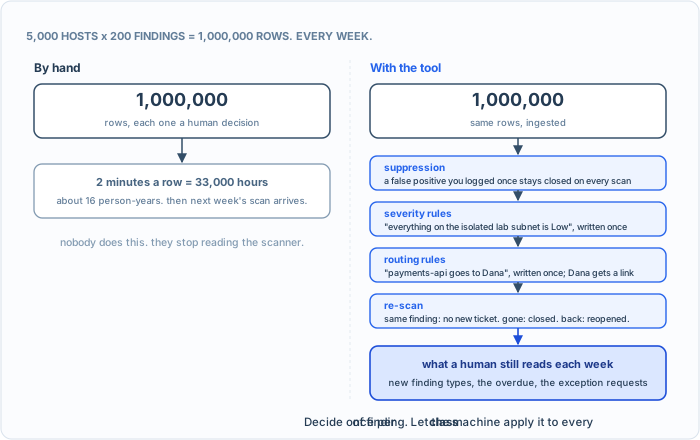
Same million rows, two ways. The difference is not speed. It is that the human decides once per class and the machine applies it to every row.
Here is the thing that makes it doable, and it is not “the computer is fast.” It is that almost none of those million decisions are new. The same false positive on the same kind of host. The same Low-on-the-lab-subnet judgment. The same “payments-api goes to Dana.” A human should make each of those calls exactly once, as a rule, and never again. That is what the tool does at ingest, in three layers, on every row:
- Suppression. A false positive you log is closed on the spot and lands already closed on every scan after, so the decision you wrote down in chapter six stays dead without you re-litigating it. Global rules do the same for a whole class of finding, by scanner, asset or title.
- Severity rules. “Everything on the isolated lab subnet is Low.” Written once, applied to every matching row.
- Routing rules. An asset or a source maps to an owner. The ticket lands in Dana’s queue without anyone reading it, and Dana gets a link to update it without an account.
Then the re-scan, which is where a spreadsheet dies: the same finding on the same host does not become a second ticket, a finding that vanished from the scan closes as patched, and one that comes back reopens. The weekly million turns into the weekly delta. What is left for a person to read is the list that was always the real job: new kinds of findings, whatever is overdue, and the exception requests. Hundreds of decisions a week, not a million, and every one of them a judgment, not a copy-paste.
And here is the thing: the parts that do not scale are exactly the parts that are not thinking. Pulling findings out of a scanner. Deduplicating the exact repeats. Applying the severity rules you already wrote. Routing a ticket to the owner you already named. Chasing status. That is robot work. Paying a skilled human to do robot work is not diligence; it is waste.
What is actually worth automating
Here is what the tool actually does, job by job:
- Ingestion and deduplication. Drop the CSV or JSON export in yourself, or have your pipeline push each scan to the tool’s ingest endpoint, the address it listens on, using an API key, a secret string that stands in for a login. The findings are grouped by asset and the exact repeats dropped. It is not a scanner and it pulls nothing; you still feed it your scanners’ exports.
- Severity and the clock. With your inventory loaded, the tool sets the severity itself as each finding lands: the scanner’s word times the asset’s exposure and criticality, banded the way chapter six banded it, and the SLA clock follows. Then the threat intelligence you load moves it: a finding that names a CVE in the KEV catalog goes to Critical. Threat intelligence here means outside knowledge of what attackers are using: the KEV catalog is one kind, and EPSS, a published score of how likely a CVE is to be exploited soon, is another. The tool fetches neither; you hand it the file, and it uses only the first.
- Routing. Rules that match a source or an asset assign the ticket to the right owner, with the SLA from your policy.
- Exceptions and extensions. Dated, capped extensions the owner can request from their link; risk-accepted findings held as their own status so a re-scan never quietly closes them.
- Metrics. The live view: a blended MTTR, what is overdue, and how findings resolved, patched or accepted or false positive. The next chapter.
And one more for the pentesters, covered back in chapter five: report intake on the way in, and a branded engagement report on the way out.
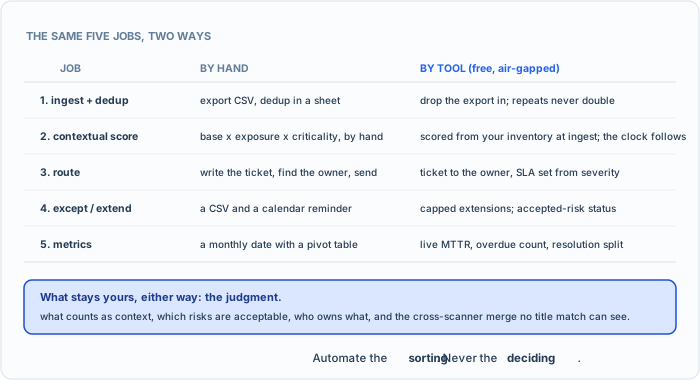
Same five jobs, two ways. The tool does the typing; the deciding stays with you.
Run a million rows through it, step by step
Here is the honest test of everything above, and you can do every step of it yourself. Not on the 29-row sample: on the million. make-million.py generates the exact file I used, deterministically, so your numbers match mine: ten thousand hosts of the same eight kinds as sample-assets.csv, lumpy the way a real estate is, with a few hosts carrying over a thousand findings and most carrying a few dozen; four real known-exploited CVEs mixed in, which between them land on 2,009 of the rows; and, written beside the findings, assets-1m.csv, the inventory for all ten thousand.
python3 make-million.py > findings-1m.csv
1,000,000 rows, 10,000 assets, 208 MB, 2.8 s
largest host 1,900 findings, median 67, smallest 4; assets-1m.csv written
Critical 125,600 · High 250,611 · Medium 372,532 · Low 251,257
That summary is the script’s own output (it prints it to the terminal when it finishes), and the second line is the lumpiness: the biggest host carries 1,900 findings, the typical one 67. The seconds will differ on your machine; if the counts match, your file matches mine byte for byte.
Then the tool. It is a single Go binary, on GitHub:
git clone https://github.com/Kuebiko-LLC/riskrancher.git
cd riskrancher
go build -o rr ./cmd/rr
./rr
Open http://localhost:8080 and register the first user; that account is the Sheriff. Then it is six screens. Each step below also shows the call the click makes, as a curl command, so a pipeline can do what your mouse does; a script would send an API key, minted by the Sheriff, instead of the browser’s cookie. As in chapter six, the receipts come from a throwaway instance on port 8093, not the tracker I use on 8080; yours answers on 8080 unless you set RR_ADDR. Every line after a $ below is exactly the line that ran, on an Apple M3 Pro laptop with 18 GB of memory.
1. Build the adapter. Admin, Adapters, New. Click Load and pick findings-1m.csv; the builder reads the header and shows you a preview row. Name it, give it a source name, and map the five fields: title to title, asset to asset, severity to severity, description to description, remediation to remediation. The file has twelve columns and the tool keeps five, on purpose: cve, cvss, kev, exposure and asset_criticality are there for the by-hand exercise in chapter six. The tool takes exposure and criticality from the inventory you load in the next step, not from the finding file, so a scanner cannot vote on how much you care about a box; and the KEV flag comes from the catalog you load, not from this column. Save and enable.
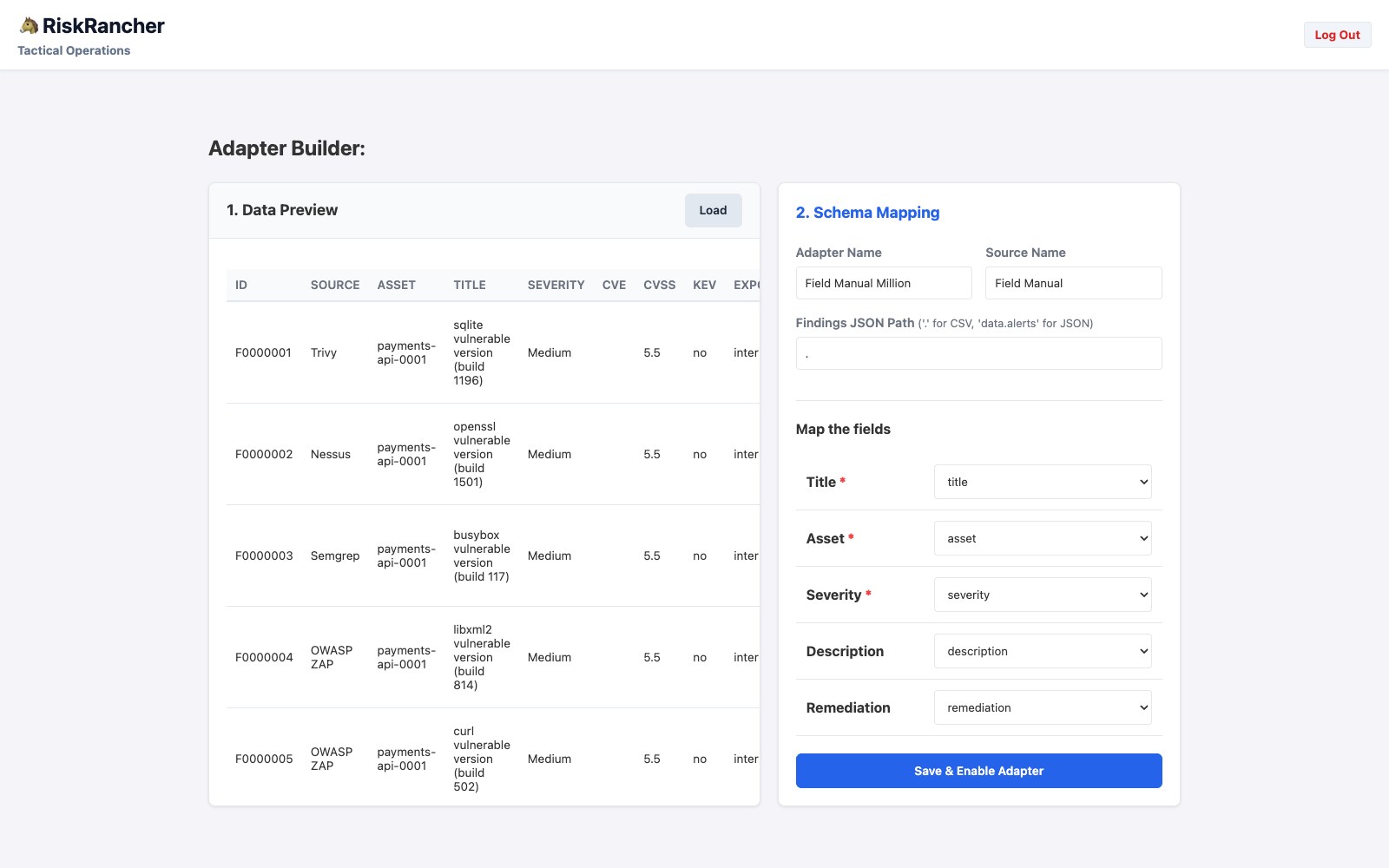
You do this once per scanner, not once per scan. The adapter is the map from their columns to the tool’s five fields.
2. Load the inventory. Configuration, Asset inventory, Load inventory, and pick assets-1m.csv, the file the generator wrote beside the findings: ten thousand hosts, each with a criticality, an exposure and an owning team, in the same five columns as chapter two’s. From here on, every finding that lands on one of them is scored as it lands. The receipt for this step is in the block below, with the 29 rows.
The 29 rows first. Before the million, the file you worked by hand. It has the same twelve columns, so the same adapter takes it, and chapter two’s inventory goes in ahead of it, as in chapter six: Load inventory, then Ingest, pick the adapter, drop sample-findings.csv. The receipt, starting with the sign-in that gives curl the same cookie your browser has:
$ curl -s -c cookies.txt -X POST http://localhost:8093/api/auth/login -H 'Content-Type: application/json' -d '{"email":"sheriff@rr.test","password":"<yours>"}'
$ curl -s -b cookies.txt -F file=@sample-assets.csv http://localhost:8093/api/admin/assets/csv
{"loaded":8,"rescored":0}

$ curl -s -b cookies.txt -o /dev/null -w 'ingest %{http_code} in %{time_total}s\n' -F adapter_name='Field Manual Million' -F file=@sample-findings.csv http://localhost:8093/api/ingest/csv
ingest 201 in 0.003153s
$ sqlite3 data/riskrancher.db "select count(*), severity from tickets group by severity order by case severity when 'Critical' then 1 when 'High' then 2 when 'Medium' then 3 else 4 end"
5|Critical
9|High
6|Medium
9|Low
$ curl -s -b cookies.txt -o /dev/null -w 'ingest %{http_code} in %{time_total}s\n' -F adapter_name='Field Manual Million' -F file=@sample-findings.csv http://localhost:8093/api/ingest/csv
ingest 201 in 0.001587s
$ sqlite3 data/riskrancher.db "select count(*) from tickets"
29
$ sqlite3 data/riskrancher.db "select title from tickets where title like '%og4%'"
CVE-2021-44228 Log4Shell RCE
Apache Log4j2 Remote Code Execution
data/riskrancher.db is the one file the tool keeps everything in, next to where you ran it, and sqlite3 is the command-line program that opens such files. You can skip those lines and read the same counts off the metrics page. Before the million I cleared those 29 rows so the counts below stay round; on your instance they simply ride along.
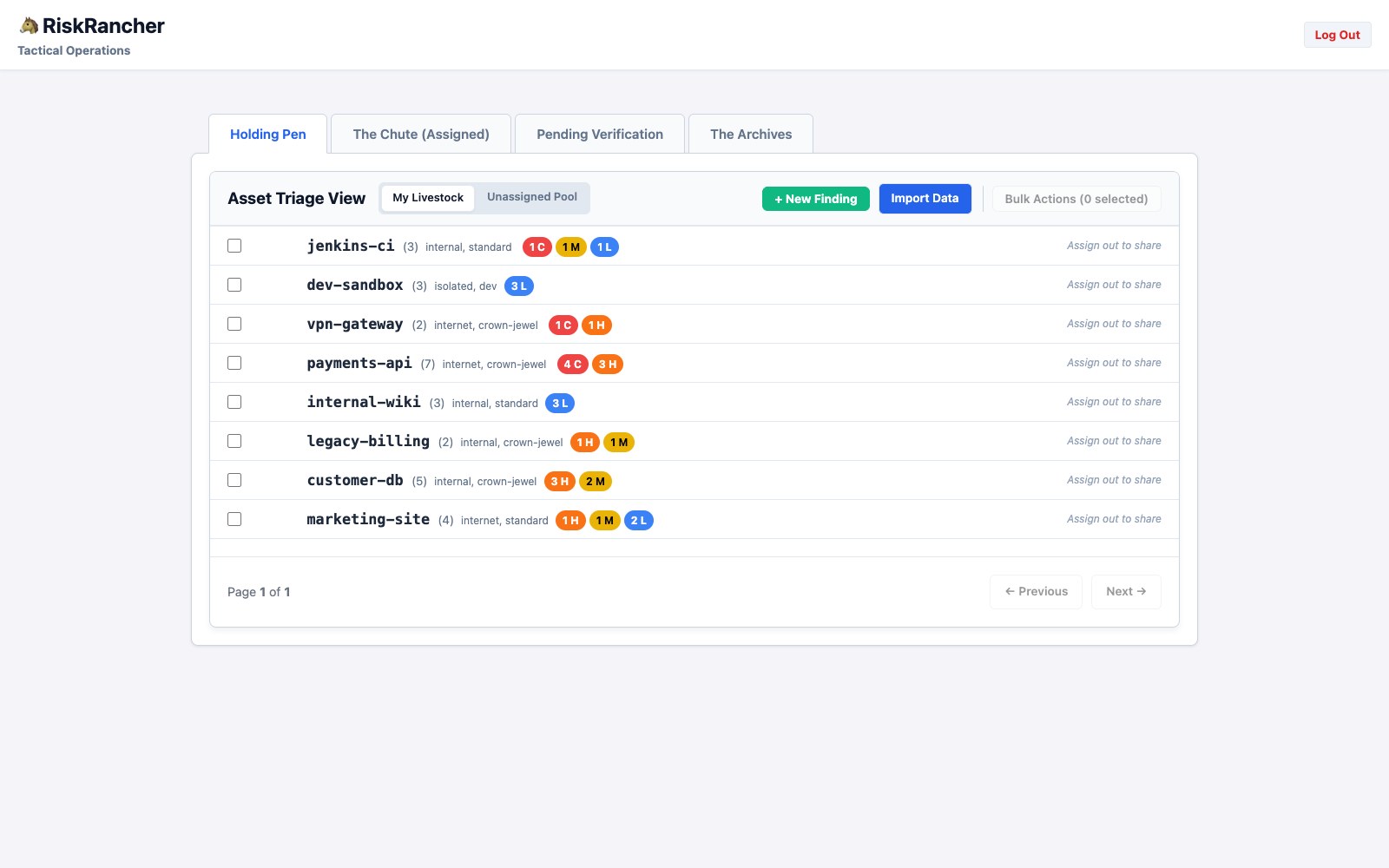
Twenty-nine tickets, eight assets, the severities the rubric gave them, with each asset’s two labels beside its name, and a second upload of the same file created nothing, because the dedup held. This frame is from chapter six’s run, after the catalog load, which is why jenkins-ci carries one Critical: the Rapid Reset the catalog raised. Chapter six’s two false positives and three merges are not here: Trivy’s Log4Shell and Nessus’s Log4j2 are still two rows, and the three OpenSSL findings on customer-db are still three, because their titles differ and those calls are yours. The tool sorted and scored; you still decide.
3. Ingest. Ingest, pick the adapter you just built, drop the file on the zone.
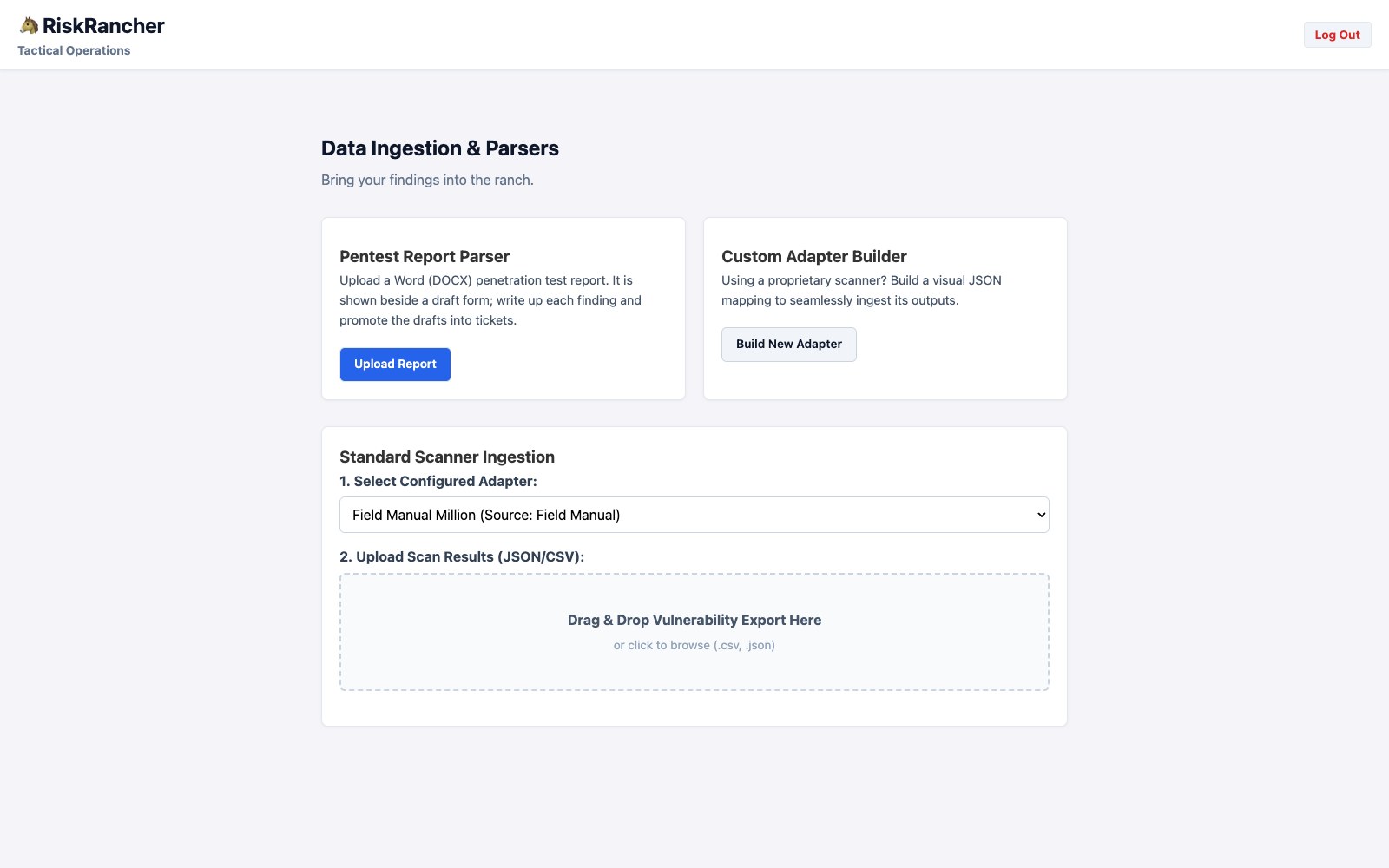
Same page every week. Pick the adapter, drop the export, walk away.
The inventory goes in first, ten thousand rows in one call, so the rubric is waiting when the findings arrive. Then the upload and ingest of the full million took 84 seconds and came back HTTP 201. I did not type that number from memory; it is the timer on the request, and every number on this page comes from one run of the build you just cloned. The database file afterward was 1.1 GB, which is the honest cost of keeping a million rows, each with its description and its fix, that you can query.
$ curl -s -b cookies.txt -F file=@assets-1m.csv http://localhost:8093/api/admin/assets/csv
{"loaded":10000,"rescored":0}

$ curl -s -b cookies.txt -o /dev/null -w 'ingest %{http_code} in %{time_total}s\n' -F adapter_name='Field Manual Million' -F file=@findings-1m.csv http://localhost:8093/api/ingest/csv
ingest 201 in 84.278506s
$ ls -l data/riskrancher.db | awk '{print $5, $9}'
1142915072 data/riskrancher.db
$ sqlite3 data/riskrancher.db "select count(*) from tickets"
1000000
$ sqlite3 data/riskrancher.db "select count(distinct asset_identifier) from tickets"
10000
$ sqlite3 data/riskrancher.db "select scanner_severity, count(*) from tickets group by scanner_severity order by case scanner_severity when 'Critical' then 1 when 'High' then 2 when 'Medium' then 3 else 4 end"
Critical|125600
High|250611
Medium|372532
Low|251257
$ sqlite3 data/riskrancher.db "select severity, count(*) from tickets group by severity order by case severity when 'Critical' then 1 when 'High' then 2 when 'Medium' then 3 else 4 end"
Critical|93685
High|234951
Medium|295283
Low|376081
$ sqlite3 data/riskrancher.db "select asset_identifier, count(*) from tickets group by asset_identifier order by 2 desc limit 3"
legacy-billing-1152|1900
customer-db-0503|1850
dev-sandbox-0574|1554
4. Look at what it counted. The admin metrics page, straight after.
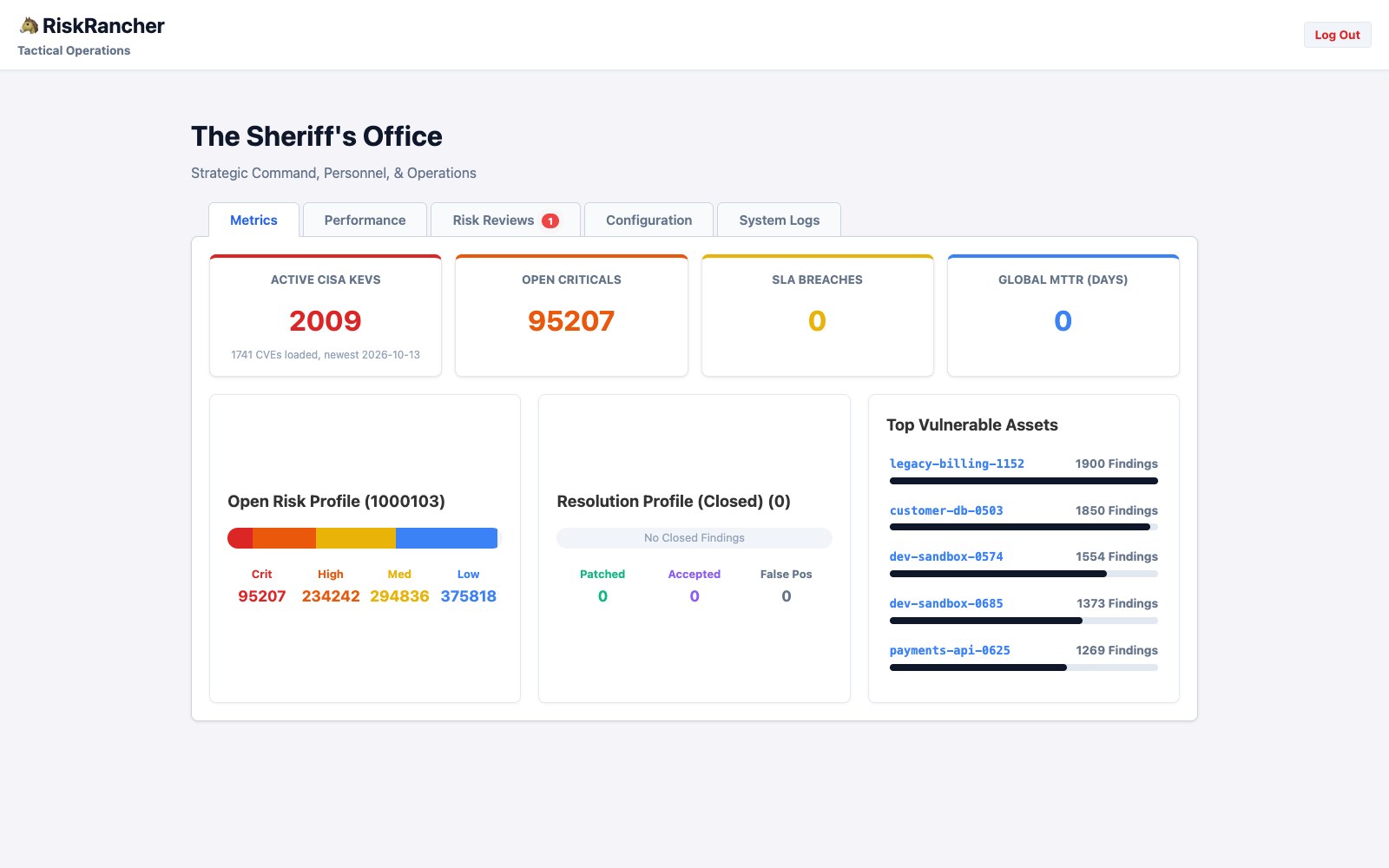
Not the split the file was generated with. The scanners said 125,600 Critical; the rubric, run against the inventory as each row landed, says 93,685, because a scanner Critical on an internal crown jewel is an 8, High, and on an isolated sandbox a 1, Low, while a High on an internet crown jewel is a 12, Critical. The receipt above has both splits. This frame is from the end of the run, after the catalog load and one extra host, so the Critical card reads 95,207 and the KEV card 2,009. A million rows, scored and counted, in under ninety seconds. Nobody read any of them yet, and that is the point: arithmetic is the machine’s job.
5. The queue, grouped by asset. The Holding Pen is where a person starts reading.
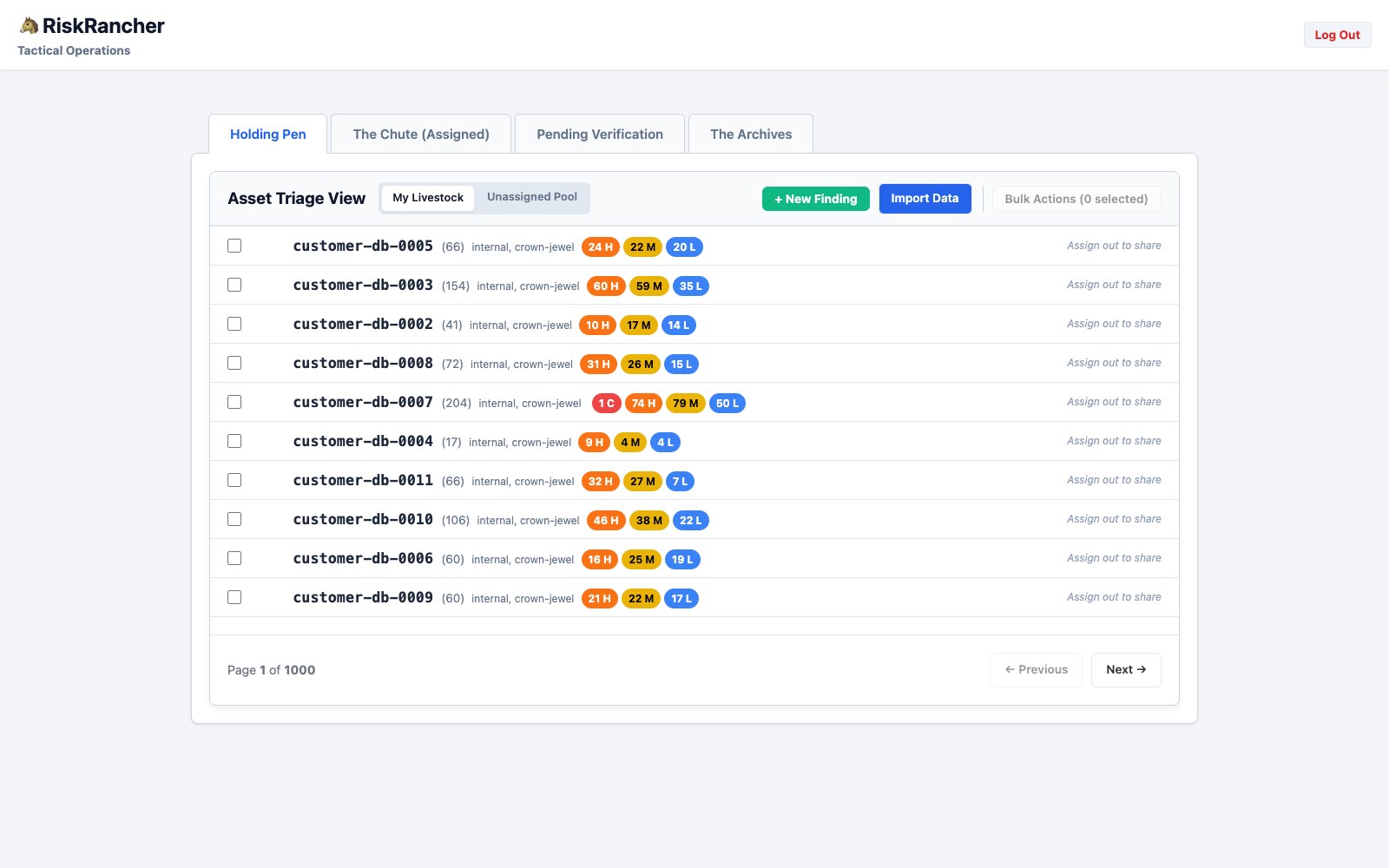
Ten assets a page, every finding of each asset on the same page, a thousand pages for ten thousand hosts, between a fifth and two fifths of a second a page: 0.22 to 0.41 seconds for page 1 and page 500, each loaded twice, in the receipt below the picture. Look at the counts beside the names: 66, 154, 41, 72, 204. A real estate is lumpy, and the pen takes a host of two hundred findings in one group as easily as a host of seventeen. Notice too that no customer-db host shows a Critical: internal crown jewels top out at 8, High, until the catalog says otherwise. A confession: the first time I ran a million rows through, the pen paged by fifty findings instead of by asset, which at two hundred findings a host meant one host per page and twenty thousand pages. That is what running the million taught me, and it is fixed in the build you just cloned. Nobody is going to page through a thousand either, though. What you do instead is below.
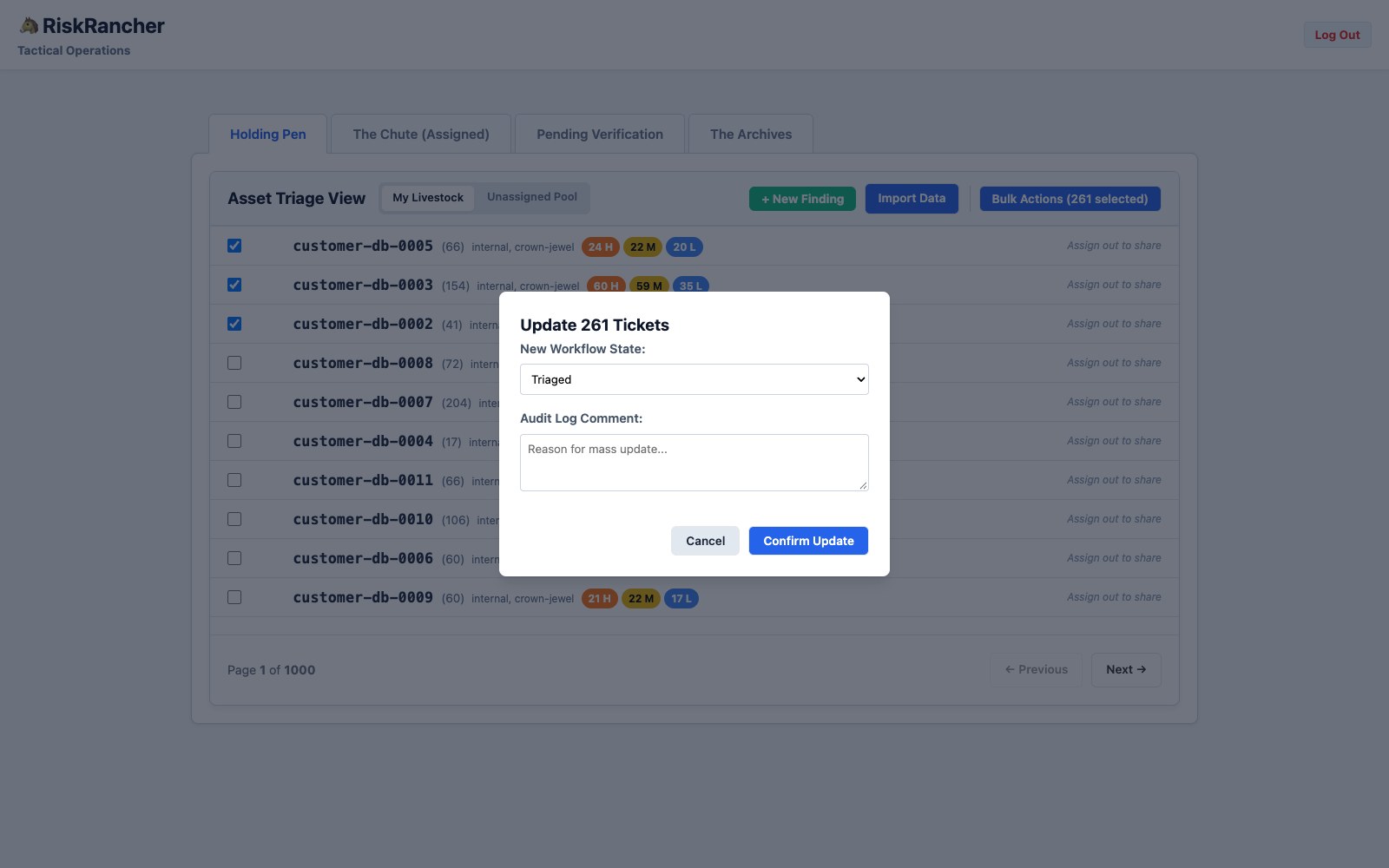
6. Decide once, apply to many. Tick three assets, open Bulk Actions. The dropdown offers the states from chapter nine that a person can set by hand: Triaged (looked at), Assigned Out (handed to an owner, with a name), Pending Verification, False Positive, and Patched (verified). Pick Triaged for this one, write the comment, confirm.
$ for p in 1 1 500 500; do curl -s -b cookies.txt -o /dev/null -w "page $p: %{time_total}s\n" "http://localhost:8093/dashboard?tab=holding_pen&page=$p"; done
page 1: 0.224843s
page 1: 0.225770s
page 500: 0.317041s
page 500: 0.413080s
$ curl -s -b cookies.txt 'http://localhost:8093/dashboard?tab=holding_pen' | grep -o 'Page <strong>1</strong> of <strong>[0-9]*</strong>'
Page <strong>1</strong> of <strong>1000</strong>
Three assets ticked, two hundred and sixty-one findings, one decision, one comment in the audit log. The tool writes it two hundred and sixty-one times. At scale you do not click this per asset either; you write rules.
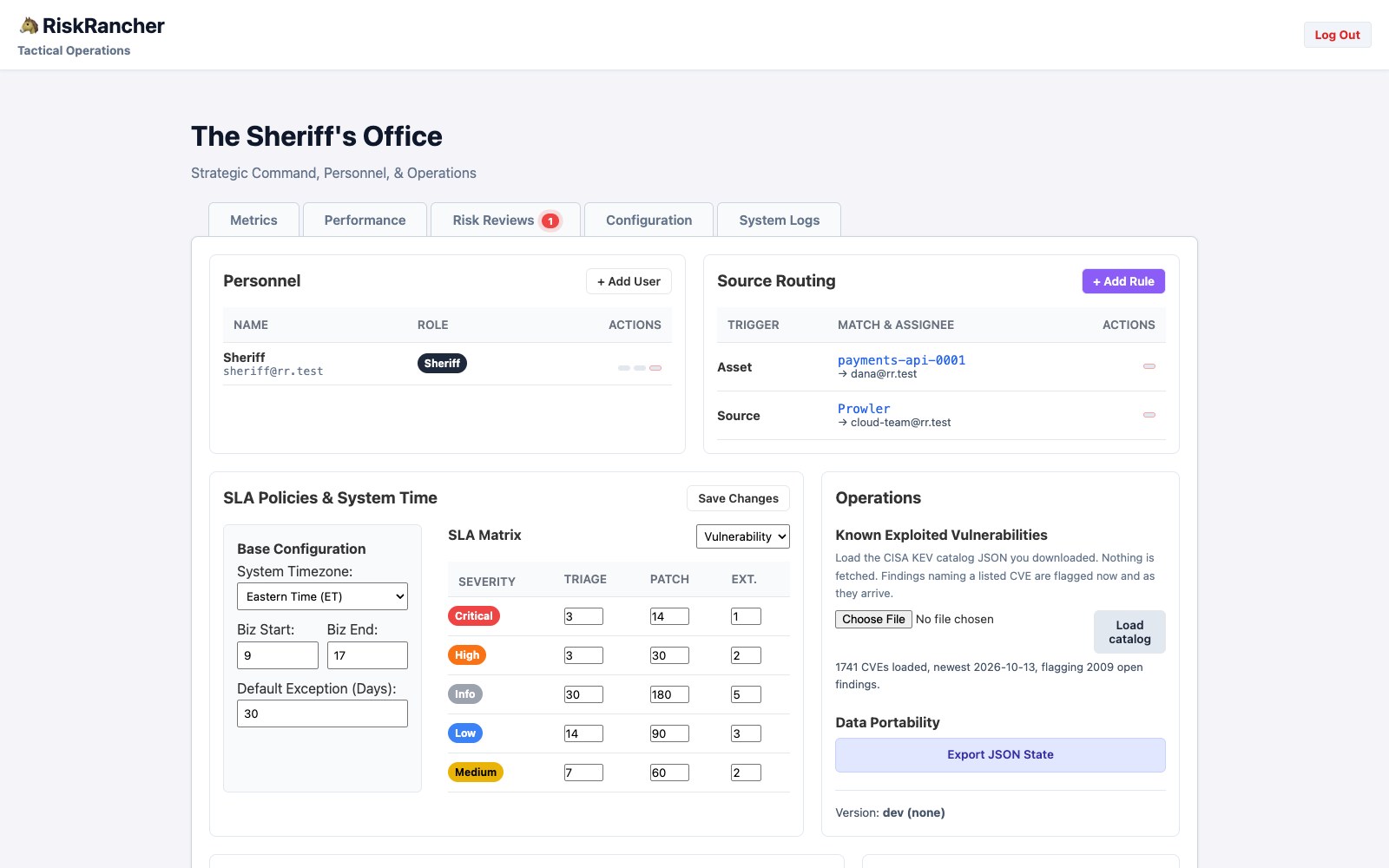
The top of Configuration. Routing rules on the right, made with Add Rule: pick Asset or Source as the trigger, type the value to match, name the owner. This asset goes to Dana; everything that arrives through a Prowler adapter goes to the cloud team; written once, applied to every row that arrives after. The SLA matrix below is where you type the book’s clock in (chapter nine’s bridge: Critical 3, High 14, Medium 30, Low 90), and the catalog control under Operations is where the KEV list goes.
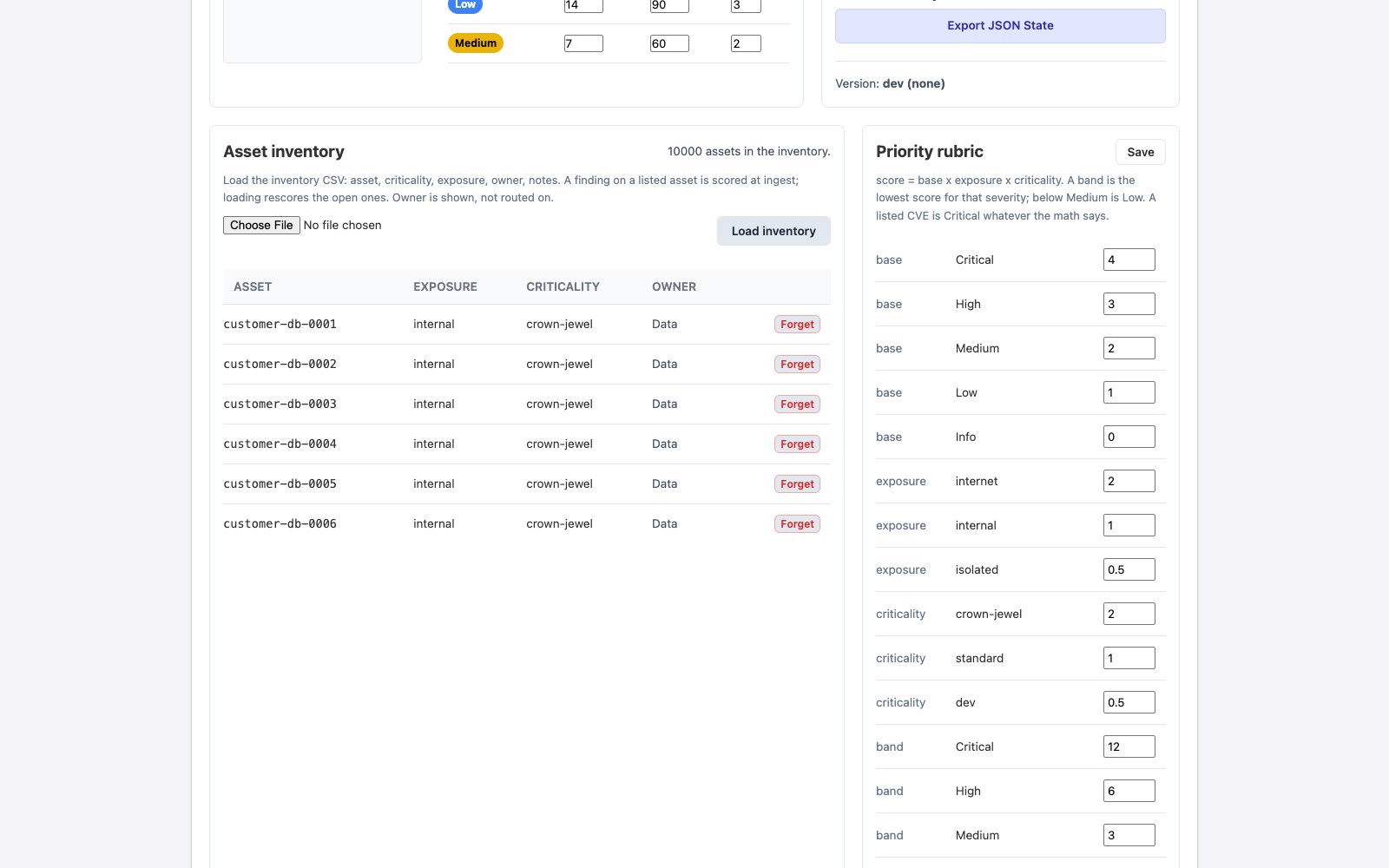
The two cards that make the rubric the tool’s. The inventory is chapter two’s file, loaded as it is; the rubric is chapter six’s table, every number editable, and Save rescores every open finding on a listed asset and writes a line in each one’s history.
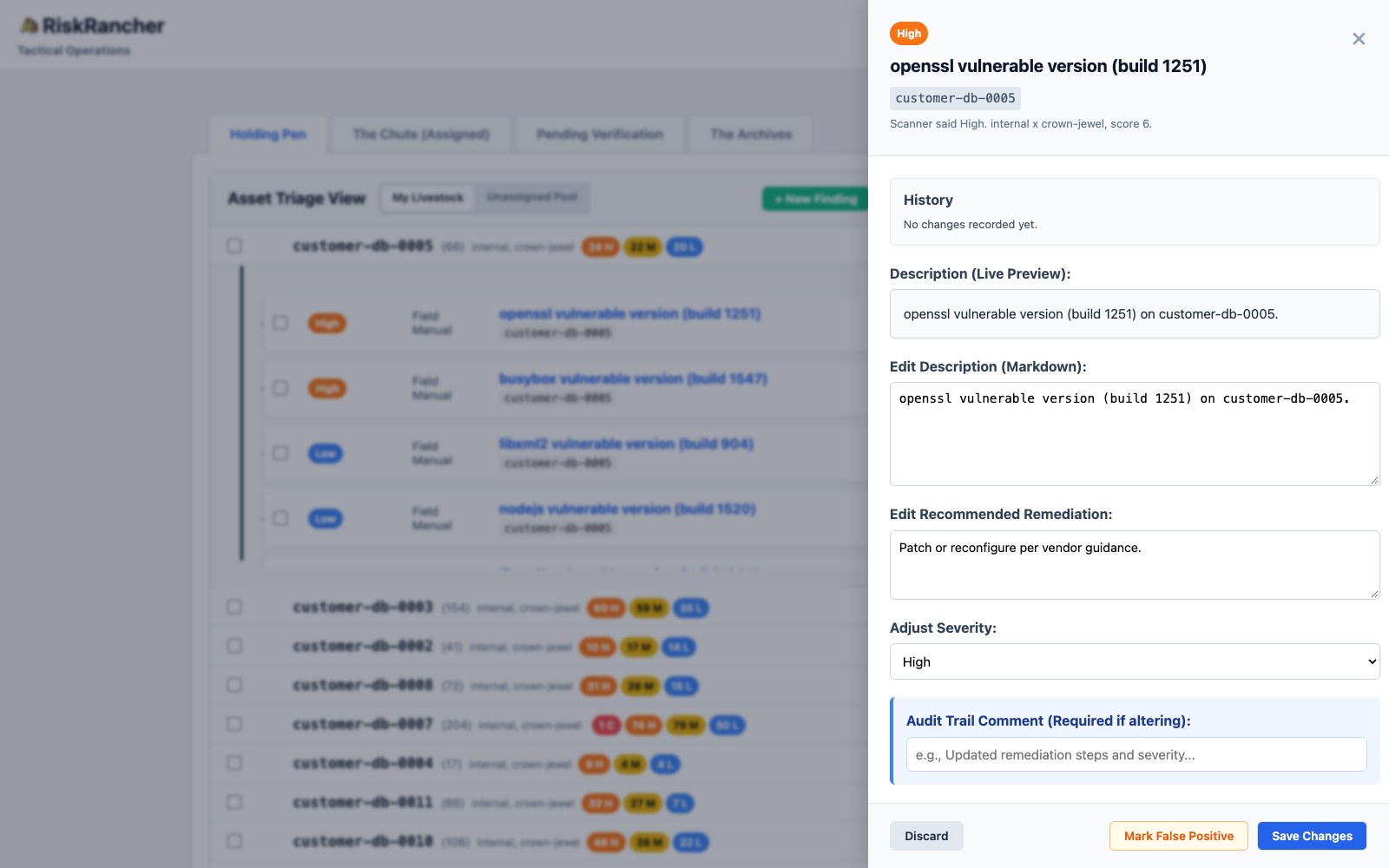
Click any finding and the drawer says how it got its severity: the scanner’s word, the asset’s two multipliers, the score. When the catalog or a rule decided instead, the line says that. Nobody has to trust the dial; they can check the sum.
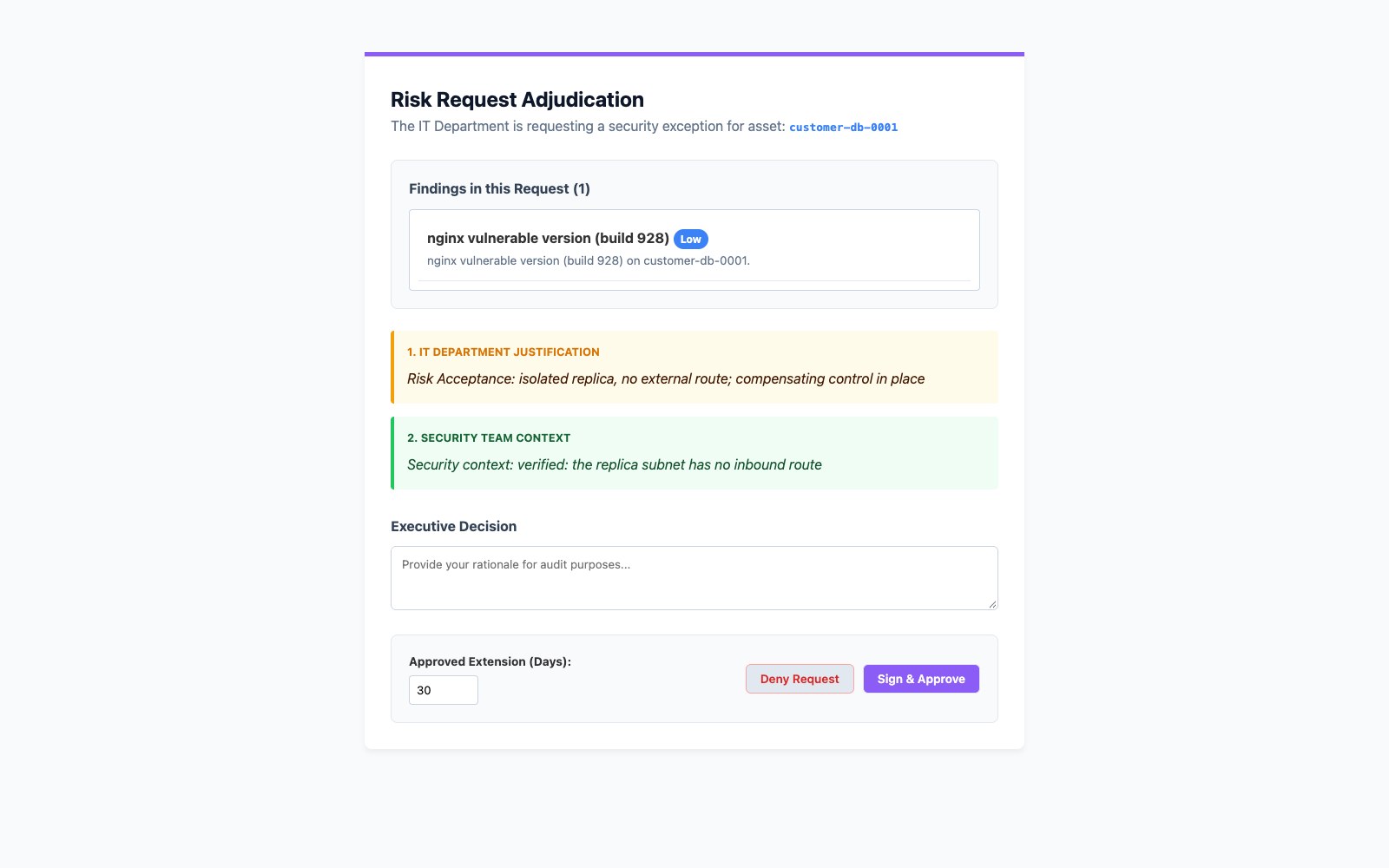
The other end of an owner’s link. Dana got a link, not an account; on it she ticked one finding, chose Accept the risk, and wrote why. The request landed in the Sheriff’s Risk Reviews tab; the Sheriff added what security verified and clicked Copy Batch Link, which mints a link of the other kind. The approver opened it and sees exactly this: Dana’s reason, the Sheriff’s note, and two buttons. Sign, and the finding is held as Risk Accepted with the approver’s name and a date it comes back on. That is chapter eight, on the record, with nobody logging in.
The receipt for that last picture, from the hand-out to the signature. The one line not shown in full is the 575 ticket ids in the bulk call:
$ curl -s -b cookies.txt -X PATCH http://localhost:8093/api/tickets/bulk -H 'Content-Type: application/json' -d '{"ticket_ids":[<the 575 ids of customer-db-0001>],"status":"Assigned Out","assignee":"dana@rr.test","comment":"yours this sprint"}'
{"batch_token":"c1072cf12a9bdefbd6cd0121
...}
$ OWNER=<the batch_token above>   # Dana's link is /share/$OWNER
$ curl -s -X POST http://localhost:8093/api/share/$OWNER/risk -H 'Content-Type: application/json' -d '{"ticket_ids":[418586],"type":"Risk Acceptance","rationale":"isolated replica, no external route; compensating control in place"}' -o /dev/null -w '%{http_code}\n'
200
$ curl -s -X PATCH http://localhost:8093/api/share/$OWNER/review -H 'Content-Type: application/json' -d '{"action":"Approve","comment":"me","extension_days":30}' -w '%{http_code}\n'
This link cannot do that
403
$ curl -s -b cookies.txt -X POST http://localhost:8093/api/tickets/review-link -H 'Content-Type: application/json' -d '{"ticket_ids":[418586],"context":"verified: the replica subnet has no inbound route"}'   # Copy Batch Link makes this call
{"token":"c286bdb578e84facb784bcbe68fab72800849dd943d1baff9b37cdf3d5e89bba"}
$ APPROVER=<the token above>   # the approver's link is /review/$APPROVER

# (after the screenshot) the approver signs; the finding is held with a name and a date
$ curl -s -X PATCH http://localhost:8093/api/share/$APPROVER/review -H 'Content-Type: application/json' -d '{"action":"Approve","actor":"Legal / Compliance","comment":"accepted for 180 days","extension_days":180,"ticket_ids":[418586]}' -w '%{http_code}\n'
200
$ sqlite3 data/riskrancher.db "select id, status, risk_approved_by, substr(exception_expires_at,1,10) as back_on_queue from tickets where id = 418586"
418586|Risk Accepted|Legal / Compliance|2027-04-12
$ curl -s -o /dev/null -w '%{http_code}\n' http://localhost:8093/api/share/$APPROVER/review   # nothing left to decide: the link has ended
404
Read the configuration and approver screens together, because they are the whole argument of this chapter. The queue at a million rows is not readable by a human, however well it pages, and the tool does not pretend otherwise. What makes the million survivable is not the Holding Pen. It is that the rules in Configuration run on every row at ingest, the bulk action turns one judgment into six hundred writes or five thousand, and the next scan arrives already routed, already on the right person’s link.
Three honest footnotes on what you are looking at. First, the catalog. You download the CISA JSON yourself and load it from the Configuration tab, under Operations. Against the full million it flags the 2,009 findings that name a listed CVE in just over a second and raises the 1,511 of them that were not already Critical, each with a line in its history that says the catalog did it. From then on a finding that arrives naming a listed CVE lands Critical. I checked that by uploading one host’s 452 rows under a name the inventory does not know: its four catalog CVEs came in Critical, one of them up from a scanner High, and the other 448 kept the scanner’s word, because an asset the tool does not know gets no rubric. Second, the routing rules in the configuration screenshot were added after the ingest, so nothing is assigned in that frame. I then re-uploaded one host’s 103 rows and the rule handed all 103 to Dana with no new tickets created, so write your rules whenever you like and the next upload routes. Third, the receipts for both:
$ curl -s -b cookies.txt -w 'load %{http_code} in %{time_total}s\n' -F cisa_catalog_file=@known_exploited_vulnerabilities.json http://localhost:8093/api/integrations/cisa/sync
{"message":"CISA KEV Catalog synced successfully","raised":1511,"status":"success","vulnerabilities":1741}
load 200 in 1.287607s
$ curl -s -b cookies.txt http://localhost:8093/api/integrations/cisa
{"loaded":1741,"last_added":"2026-10-13","flagged_open":2009}

$ sqlite3 data/riskrancher.db "select count(*) from tickets where is_cisa_kev = 1"
2009
$ sqlite3 data/riskrancher.db "select severity, count(*) from tickets group by severity order by case severity when 'Critical' then 1 when 'High' then 2 when 'Medium' then 3 else 4 end"
Critical|95196
High|234214
Medium|294790
Low|375800
$ sqlite3 data/riskrancher.db "select count(*) from ticket_activity where activity_type = 'rescored' and actor = 'KEV sync'"
1511

# A host with catalog CVEs on it arrives after the load, under a name the inventory does not know: the listed CVEs come in Critical, the rest keep the scanner's word
$ python3 -c "import csv; rows=[r for r in csv.DictReader(open('findings-1m.csv')) if r['asset']=='dev-sandbox-0028']; [r.update(asset='dev-sandbox-0028-new') for r in rows]; w=csv.DictWriter(open('new-host-2.csv','w',newline=''), fieldnames=rows[0].keys(), lineterminator='\\n'); w.writeheader(); w.writerows(rows); print(len(rows), 'rows, kev=yes:', sum(r['kev']=='yes' for r in rows))"
452 rows, kev=yes: 4
$ curl -s -b cookies.txt -o /dev/null -w 'ingest %{http_code} in %{time_total}s\n' -F adapter_name='Field Manual Million' -F file=@new-host-2.csv http://localhost:8093/api/ingest/csv
ingest 201 in 0.147431s
$ sqlite3 data/riskrancher.db "select count(*), sum(is_cisa_kev), sum(rubric_score is null), sum(severity = 'Critical') from tickets where asset_identifier = 'dev-sandbox-0028-new'"
452|4|452|69
$ sqlite3 data/riskrancher.db "select scanner_severity, severity, is_cisa_kev from tickets where asset_identifier = 'dev-sandbox-0028-new' and is_cisa_kev = 1"
Critical|Critical|1
Critical|Critical|1
High|Critical|1
Critical|Critical|1

# The routing rule picks up a host on its next scan: the same rows again, no doubles
$ python3 -c "import csv; rows=[r for r in csv.DictReader(open('findings-1m.csv')) if r['asset']=='payments-api-0001']; w=csv.DictWriter(open('rescan-0001.csv','w',newline=''), fieldnames=rows[0].keys(), lineterminator='\\n'); w.writeheader(); w.writerows(rows); print(len(rows), 'rows')"
103 rows
$ sqlite3 data/riskrancher.db "select status, assignee, count(*) from tickets where asset_identifier = 'payments-api-0001' group by 1, 2"
Waiting to be Triaged|Unassigned|103
$ curl -s -b cookies.txt -o /dev/null -w 'ingest %{http_code} in %{time_total}s\n' -F adapter_name='Field Manual Million' -F file=@rescan-0001.csv http://localhost:8093/api/ingest/csv
ingest 201 in 0.011188s
$ sqlite3 data/riskrancher.db "select status, assignee, count(*) from tickets where asset_identifier = 'payments-api-0001' group by 1, 2"
Assigned Out|dana@rr.test|103
$ sqlite3 data/riskrancher.db "select count(*) from tickets"
1000103
If you ran it, you have an adapter, an inventory of ten thousand hosts the tool scores against, the 29 raw rows as tickets, a million more that a person never had to read and that landed already ranked, a routing rule that hands a host to its owner on the next upload, and a risk acceptance with a date on it. The whole thing is free, and the reason is plain: I would rather more people did this work than paid me for the feeling of having done it. If it helps, use it. If you would rather keep your spreadsheet, you now know exactly how to run the program without it, because you just did, on the same 29 rows. Either way, go do the work.
Automate the boring, keep the judgment
One line to keep you honest as you scale: automate the sorting, never the deciding. The tool can deduplicate, apply your severity rules, and route all day. It should not be the thing that decides what your context is, which risks are acceptable, or who owns what. Those are judgment, and judgment is the part of this job worth a human.
A program that tries to automate the thinking is worse than a spreadsheet, because it launders bad decisions through a machine and calls them objective. A program that automates only the typing is how you finally outrun the flood. Put the robot work down. Pick the judgment up. Then go find out whether any of it is actually working, which is a question of numbers.